Thursday, January 8, 2009

Digital Biography: Beware of what you post on the Web!

Here are a few updates on the topic of “Online Privacy” that was posted on my Blog (November 21, 2008).

Elizabeth Church, in the December 23 Globe and Mail (Where everybody knows your teenaged musings) explores the ramifications of Web postings on the Web.  “Seth Tee got his first Hotmail account in Grade 4. By high school he was posting content on the Web. Now, at the sober age of 22, the University of British Columbia student realizes his teenage musings are just “a Google search away” for the rest of the world, and there is not much he can do to take them back.”   In an effort sensitise students to the potential pitfalls of Web postings, UBC (University of British Columbia) has developed the “digital tattoo” project.  (Visit: http://digitaltattoo.ubc.ca/).

To help users understand the consequences of posting personal information on Web, specifically, on Social Networks sites, the Office of the Privacy Commissioner of Canada has a short 3 min video: Privacy on Social Networks: What does a friend of a friend of a friend need to know about you?

On Youtube:

Educators should read Ericka Mellon’s article “Teachers face dilemma with Facebook; Educators find benefits, pitfalls when adding students as friends on the social networking Web site” posted in the December 20th Houston Chronicle.

Wednesday, January 7, 2009

Rethinking Computers in the Classroom

Is having a computer on every desk the solution to increase testing scores or is providing the necessary training and revising the curriculum to reflect the real world the solution?

"Obama wants more PCs for kids, and Harvey Milk Academy is one school doing just that. But a 21st-century, computer-focused curriculum is the real challenge"

"What's needed, say educators and technology advocates, is a 21st-century curriculum that harnesses PCs and the Internet to equip kids with skills needed in the modern workplace, like critical thinking, analysis, and communications." 
An article by Aaron Ricadela (Business Week, Technology December 16, 2008) is a must read for educators!

Tuesday, January 6, 2009

Ecofont good for all

What is the true cost of printing?
When you are printing the true cost per page is determined by several factors, the cost of the paper, the type of printing (colour or B&W) and the amount of ink used. If you need to print your email messages, map directions or other such items and you know that you will be throwing them away there are ways to save money.
The greenest way to go would be to refrain from this excessive printing. But what if you don’t have a GPS and you need those driving directions from Google or Yahoo maps?
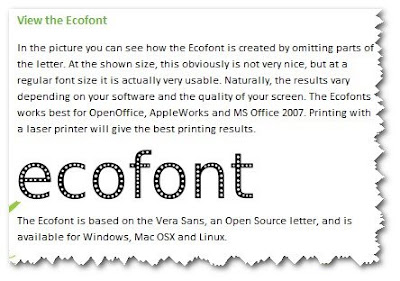
One way to save resources (ink and money) would be to use a font that requires less ink when printing. Ecofont, a creation of Colin Willems uses the Swiss cheese approach to printing. The font is based on the Vera Sans with tiny circles placed within the characters to reduce the total ink/toner laid upon the paper.
Ecofont consumes about 20% less ink and it is free!

Visit Ecofont to learn more and to download this “green font”


Monday, December 15, 2008

Safety and Education on YouTube

With the proliferation of online bullying and inappropriate postings, tagging and comments on the Web via different Web tools such as social networking sites (Facebook, My Space, etc...)  or even on YouTube, content providers are finally stepping in.

In an effort to help the online users Google, YouTube’s parent company, has just launched a new “Abuse and Safety Center” which is meant to help make the site as safe as possible for families. The new section offers tips from organizations including the Anti-Defamation League, the National Center for Missing and Exploited Children, and the National Crime Prevention Council. 

"Our new Abuse and Safety tool lets users better manage their channel, giving them the option of blocking specific users from making comments or sending e-mails, and makes communication with us about hate speech, harassment, and privacy concerns straightforward and specific," YouTube spokesperson Scott Rubin told TechNewsWorld.

http://www.technewsworld.com/story/65491.html

For more info visite Goolgle's official Blog at:

http://googleblog.blogspot.com/2008/12/safety-education-and-empowerment-on.html


Tuesday, December 2, 2008

Collective Intelligence... How Private is your digital Information?

Electronic banking, digital medical records keeping, e-shopping, online or elearning, electronic tax filing, Social Networks... these are but a few of the digitals processes that we are using in our daily lives. But, are these safe, are we leaving behind a trail of information, “a digital footprint”?
Are we closer to George Orwell’s novel “Nineteen eighty-four”, where he states that "Big Brother is watching you".
John Markoff in his article “You’re Leaving a Digital Trail. What About Privacy?” (New York Times November 19th) describes a project from M.I.T. were: “Mr. Brown and about 100 other students living in Random Hall at M.I.T. have agreed to swap their privacy for smartphones that generate digital trails to be beamed to a central computer. group of M.I.T students.”
This article offers a glimpse in the new field referred as “collective intelligence” where “The students’ data is but a bubble in a vast sea of digital information being recorded by an ever thicker web of sensors, from phones to GPS units to the tags in office ID badges, that capture our movements and interactions. Coupled with information already gathered from sources like Web surfing and credit cards, the data is the basis for an emerging field called collective intelligence.”
You’re Leaving a Digital Trail. What About Privacy?”

Friday, November 28, 2008

Scared Of Technology? You're Old!

Ask a teen how he uses his cell phone and he will tell you that it is for texting. Ask the same question to most adults and they will tell you they use it for voice communication, “a portable phone”. Therein lays one of the differences between “digital natives and digital immigrants”.
“Digital Natives” (Mark Prensky, author, speaker, CEO of Games2train, etc... claims to have coined the phrase) are quite at ease when it comes to using digital tools that surround them and that are readily available to all. If you observe most young students or teens using technology, the first thing that you will notice is their fearless approach in using the new technologies, be it hardware such as computers, mp3, iPods etc... or software applications such as Social Networking.
On the other hand, you have the “Digital Immigrants” (those who are expected to adapt, assimilate and embrace the newfound technologies) are often reluctant in using these new gizmos and gadgets.
Why the discrepancy? Well it appears to be linked to your age. “According to a new study from the Pew Research Center's Internet & American Life Project, your age might have something to do with your attitudes and emotions surrounding technology.” (ReadWriteWeb: Scared Of Technology? You're Old! Written by Sarah Perez / November 17, 2008).
For more detailed information read Sarah Perez’s article Scared Of Technology? You're Old! on ReadWriteWeb’s blog.

Thursday, November 27, 2008

Screen Recording: CamStudio (Free)

When remote asynchronous training is required there is nothing more helpful and powerful than being able to record the training or teaching session. Screen recording software allows the trainer to record either or both, their screen, voice and mouse clicks. The sessions can then be posted or distributed to others.


When selecting such an application, users have a variety of tools that are readily available (Captivate, Connect, Camtasia, Quick Screen Recorder, etc...) but, at some cost.

CamStudio (Open Source) is free streaming video software that will allow the user to record anything on their screen, from mouse movements to animations. (E.g. record a Google Earth expedition).


CamStudio is able to record all screen and audio activity on your computer and create industry-standard AVI video files and using its built-in SWF Producer can turn those AVIs into lean, mean, bandwidth-friendly Streaming Flash videos (SWFs).
Here are just a few ways you can use this software:

  • You can use it to create demonstration videos for any software program
  • Or how about creating a set of videos answering your most frequently asked questions?
  • You can create video tutorials for school or college class
    You can use it to record a recurring problem with your computer so you can show technical support people
  • You can use it to create video-based information products you can sell
  • You can even use it to record new tricks and techniques you discover on your favourite software program, before you forget them

CamStudio (Open Source): http://camstudio.org/